Quick answer
How to explain AI to kids: say it is a computer program that learns patterns from lots of examples so it can make guesses. Add that guesses can be wrong, so people check. Use toys and sorting games for under-8s, hands-on tools at 8 to 10, and talk about bias and privacy at 11 to 14.
- One sentence: "AI learns from examples and makes guesses."
- Show it: sort pictures, train a model, spot AI at home.
- Be honest: AI makes mistakes and doesn't feel or understand like people.
- Use free tools you've tried first, with an adult nearby.
- Set family rules for chatbots before your child needs them.
Children are meeting AI before they can spell it: in voice assistants, video recommendations, photo filters and homework help. So knowing how to explain AI to kids is now a basic parenting skill, like explaining where rain comes from. The good news is you don't need a computer science degree.
This guide gives you word-for-word explanations for three age groups, screen-free activities, a list of free resources we checked, and an honest look at AI's mistakes, including how we use AI ourselves.
What is AI for kids? The one-sentence version
Here is a definition that works from age 5 to adult:
"AI is a computer program that learns patterns from lots of examples, so it can make guesses about new things."
Every part of that sentence does work. Learns from examples explains why AI needs data. Patterns explains how it spots cats, faces or the next word in a sentence. Guesses explains why it can be wrong. Once a child understands those three ideas, everything else is detail.
It also helps to say what AI is not. It is not alive, it does not have feelings, and it is not a person hiding in the phone, even when it sounds friendly.
How to explain AI to kids at every age
Ages 5 to 7 (Class 1 to 2, K to Grade 2)
Keep it concrete and playful. Use something they already know.
- Script: "You know how you learned what a dog is by seeing lots of dogs? Computers can learn a bit like that. If we show a computer lots of dog pictures, it can guess when a new picture has a dog. Sometimes it guesses wrong, like calling a fluffy cat a dog!"
- Point it out: "The phone guessed what you said. Did it get it right?"
- Key message: AI is a helper that guesses. Grown-ups and children still have to think.
Ages 8 to 10 (Class 3 to 5, Grades 3 to 5)
Introduce data, training and mistakes.
- Script: "AI learns from training data, which is a big pile of examples. If the examples are good, the guesses are good. If the examples are messy or missing some things, the AI makes mistakes. That's why people have to check it."
- Try it: Train a model yourself (see the free tools below) and deliberately give it bad examples. Watch it get confused.
- Key message: AI is only as good as what it learned from.
Ages 11 to 14 (Class 6 to 9, Grades 6 to 9)
Go deeper into how chatbots work, fairness and responsibility.
- Script: "A chatbot has learned from enormous amounts of text which words tend to follow which. When you ask a question, it predicts a likely answer, one piece at a time. That's why it can sound confident and still be wrong. It's predicting, not looking things up in a perfect book of facts."
- Discuss: If an AI learned mostly from one kind of person, who might it treat unfairly? Who is responsible when AI gets something wrong? What personal information should never go into a chatbot?
- Key message: AI is a powerful tool. You stay in charge of thinking and checking.
Unplugged activities: how to teach AI to kids without screens
- Fish or not fish (ages 5+). Cut out pictures of fish and rubbish. Your child "trains" you by sorting ten examples. Then show a tricky one (a plastic toy fish). What should the "AI" say? This mirrors a well-known online activity, without a screen.
- Guess my rule (ages 6+). Sort toys into two piles using a secret rule (has wheels, is red). Your child guesses the rule from examples. That is pattern-finding, which is the heart of machine learning.
- Bad training data (ages 8+). Train a sibling or parent to recognise "fruit" using only red fruit. Then show a banana. The "AI" fails, not because it is silly, but because its examples were narrow. Talk about how this happens in real AI.
- Predict the next word (ages 9+). Say "Once upon a..." and everyone guesses. Then try "The capital of France is..." and something nobody can predict. This shows how chatbots work, and why they sometimes fill gaps with made-up answers.
- Human robot (ages 6+). Your child gives you exact instructions to make a sandwich, and you follow them literally. This teaches the difference between a program that follows rules and an AI that learns from examples.
- AI spotting walk (all ages). Around the house, list things that might use AI: maps, phone cameras, video suggestions, spam filters. For each, ask "what examples did it learn from?" and "how could it get it wrong?"
Free AI for kids learning resources (checked October 2026)
If you searched for "AI for kids learning free", these are the options worth your time. We opened each one and checked what it offers. Try any tool yourself first, and sit with younger children while they use it.
| Resource | What it is | Good for |
|---|---|---|
| Teachable Machine (Google) | Train a computer to recognise your own images, sounds and poses in a web browser, with no coding | Ages 8+ with an adult; the "bad training data" experiment |
| Quick, Draw! (Google) | A game where a neural network tries to recognise your doodles; your drawings help teach it | Ages 6+; seeing AI guess in real time |
| AI for Oceans (CodeAI, formerly Code.org) | Students train AI to sort fish from rubbish and learn about training data and bias; listed for Grades 3 to 12. CodeAI says its curriculum and tutorials are free | Ages 8+; a classic first AI lesson |
| Hour of AI (India partner pages) | Activities including AI for Farmers (identify crop and grass) in Hindi, Hinglish and English, plus AI for Oceans | Indian families who want Hindi options |
| Day of AI (MIT RAISE) | A free, grade-by-grade PreK to 12 AI literacy curriculum with family resources | Teachers and parents who want structured lessons |
| Common Sense Education AI literacy lessons | Short lessons (mostly about 20 minutes) on AI bias, chatbots, deepfakes and more | Ages 11 to 18 and teachers |
| CBSE Computational Thinking and AI curriculum | From 2026-27, computational thinking for Classes 3 to 5 and foundational AI concepts for Classes 6 to 8, with support material on DIKSHA | CBSE families; know what school will cover |
AI makes mistakes: teaching honesty and safety
The most important thing to teach about AI is that it can be wrong, confidently. Children who learn that early are far safer than children who think the computer always knows.
- Check one thing. After any AI answer, verify one fact in a trusted source. Make it a game: "Can you catch the AI out?"
- AI is not a friend. It can sound kind, but it doesn't care about you the way people do. Problems and worries go to a trusted adult.
- Protect personal details. No full name, school, address, phone number or photos of themselves or friends in chatbots.
- Respect age limits. UNESCO's 2023 guidance suggested considering an age limit of 13 for generative AI in the classroom. Check each tool's terms.
- Use AI to learn, not to skip learning. Behavioural scientist Trent Cash, quoted by Science News Explores, warns: "If we offload a specific skill to AI, we're probably not going to retain that skill particularly well." Asking AI to explain your mistake is fine. Asking it to do your homework is not.
A real example: AI plus human checking
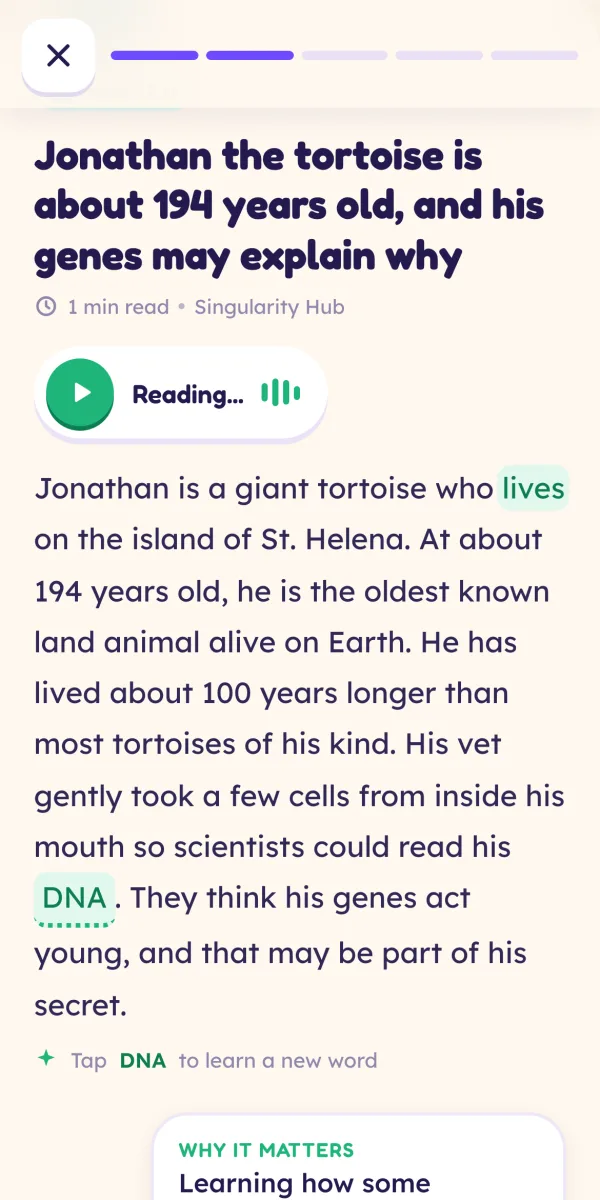
Here is a real-world example you can share with your child, and it is about us. Osmo, our app, gives children five short science and technology stories a day from publishers like NASA, ESA and ScienceDaily. We use AI to rewrite each story at three reading levels (ages 5 to 7, 8 to 10 and 11 to 14), using only facts from the original article. Then a person on our team approves every story before children see it, and every story links to its original source.
Why tell you this? Because it is a good model of how AI should be used: AI does the fast first draft, and a human checks it. UNESCO's AI competency framework for students makes the same point: the first of its four dimensions is "a human-centred mindset".
You can even turn it into an activity. Here is one real story about AI and learning, written for 5 to 7 year olds: "AI is a computer helper that can write and answer questions. If it does all your work, you learn less. If you learn from it, it can help you grow." Ask your child: what would a human checker look for in this story? Is it true? Is it clear? Is it kind?
How to teach AI literacy to kids: a four-week plan
| Week | Big idea | Do this |
|---|---|---|
| 1 | AI learns from examples | Fish or not fish, and guess my rule |
| 2 | AI makes guesses | Play Quick, Draw! and talk about the wrong guesses |
| 3 | Bad data means bad guesses | Train a model in Teachable Machine with good examples, then bad ones |
| 4 | People stay in charge | Write family AI rules together and stick them on the fridge |
Spend 15 to 20 minutes on each, once a week. By the end, your child will understand more about AI than many adults do, and they will have the habit of asking "how could this be wrong?"
Keep going
Knowing how to explain AI to kids is really about three ideas repeated often: AI learns from examples, AI makes guesses, and people check. Keep those ideas alive in everyday chat, and pair them with the wider habits in our guide to the skills kids need in the age of AI. If your child is ready for more hands-on tech, see our pick of the best STEM apps for kids and our advice on educational screen time for kids. And if you want to know exactly how we handle children's data, read our privacy page.
Frequently asked questions
What is AI in simple words for a child?
AI, or artificial intelligence, is a computer program that learns patterns from lots of examples so it can make good guesses. A photo app learns what cats look like from many cat pictures. A chatbot learns which words usually come next from huge amounts of text. It can be very useful, but it is guessing, so it can be wrong, and it does not think or feel like a person.
At what age should kids learn about AI?
You can start simple conversations at about 5, because children already meet AI in voice assistants, video recommendations and photo apps. Ages 8 to 10 suit hands-on activities like training a simple model. From 11 to 14, children can discuss bias, privacy and how chatbots work. CBSE is introducing computational thinking from Class 3 and AI concepts from Class 6 in 2026-27.
Are there free AI for kids learning resources?
Yes. Google's Teachable Machine lets children train a computer to recognise images, sounds or poses with no coding. Quick, Draw! shows a neural network guessing doodles. CodeAI (formerly Code.org) offers free activities such as AI for Oceans, and MIT RAISE's Day of AI has a free PreK to 12 curriculum. Always try a tool yourself first and supervise younger children.
Is ChatGPT safe for kids to use?
General chatbots are not designed for young children, and many set minimum ages in their terms, so check before your child uses one. UNESCO's 2023 guidance suggested considering an age limit of 13 for generative AI in classrooms. For older children, agree rules: never share personal details, double-check facts, and use AI to explain rather than to do homework for them.
How do I teach AI literacy to kids if I'm not technical?
You don't need technical knowledge. Use three ideas: AI learns from examples, AI makes guesses, and guesses can be wrong. Play sorting games, spot AI around the house, and ask 'how could it get this wrong?' Free, ready-made lessons from MIT RAISE and CodeAI explain the rest. Learning alongside your child is a great model of curiosity.
Sources
- Google: Teachable Machine
- Google: Quick, Draw!
- CodeAI (Code.org) curriculum: AI for Oceans lesson
- CodeAI (Code.org): About, open source curriculum
- CodeAI (Code.org): Hour of AI with ENpower (India)
- Day of AI, powered by MIT RAISE
- Common Sense Education: AI literacy lessons
- Morung Express (PTI, 2026): CBSE rolls out curriculum on computational thinking, AI for Classes 3-8 from 2026-27
- UN News (2023): UNESCO calls for regulations on AI use in schools
- UNESCO: AI competency framework for students
- Science News Explores: Is AI making us dumber? (Trent Cash, University of Waterloo)
Written and fact-checked by the Osmo Editorial Team. Osmo is not affiliated with the apps, publishers or organisations mentioned. Spotted something out of date? Tell us.