Quick answer
Educational screen time for kids still counts as screen time, but the type matters as much as the minutes. Follow your age band's limit (WHO and India's IAP give clear numbers for young children), prefer active over passive use, and replace screen time with something specific rather than only cutting it.
- Under 2: no screens (IAP), apart from occasional video calls with family.
- 2 to 5: no more than 1 hour a day, supervised, and less is better.
- 5 to 10: under 2 hours a day in total, including school-related screen time (IAP).
- Everyone: no screens at meals or in the hour before bed, and a written family media plan.
"But it's educational!" Every parent has heard it, and many of us have said it to ourselves while handing over a tablet. Educational screen time for kids is real and can be genuinely good. It is also still time not spent sleeping, running, reading a paper book or talking to you.
This guide sets out what the World Health Organization (WHO), the American Academy of Pediatrics (AAP) and the Indian Academy of Pediatrics (IAP) actually say, explains the difference between active and passive screen time, and gives you a family media plan you can fill in tonight. It is general guidance, not medical advice: if you are worried about your child, talk to your paediatrician.
What the guidelines say about screen time for kids
The three bodies agree on the direction and differ on detail. The WHO's 2019 guidance covers children under five. The IAP's 2022 guidelines, written for Indian families, cover every age to 18. The AAP's current family guidance centres on a framework of questions, the 5 C's, rather than a single daily number.
| Age | WHO | IAP (India) |
|---|---|---|
| Under 1 | Screen time not recommended | No screens of any type |
| 1 year | Sedentary screen time not recommended | No screens of any type (under 2) |
| 2 to 4 years | No more than 1 hour; less is better | Maximum 1 hour a day, sessions of no more than 20 to 30 minutes, always supervised |
| 5 to 10 years | Limit recreational screen time (5 to 17); average 60 minutes of moderate to vigorous activity a day | Less than 2 hours a day, including educational assignments |
| 10 to 18 years | As above | Balance screens with at least 1 hour of outdoor activity and 8 to 9 hours of sleep |
The IAP adds practical rules that apply across ages: no screens during meals or in the hour before sleep, screen-free zones such as bedrooms and the dining table, parents as role models, and short "digital fasting" times when the whole family puts devices away.
The AAP's 5 C's framework asks about your Child, the Content, whether media is the main way they Calm down, what screens are Crowding out, and Communication: "Talk about media early and often."
Does educational screen time for kids count?
Short answer: yes. The IAP's two-hour limit for ages 5 to 10 explicitly "includes recreational screen time, and time spent on screen at home to complete educational and extra-curricular assignments." It also says screen use at this age should be "mainly for the purpose of education, learning, and social interaction," with recreational screen time "kept to a minimal."
So the guidance does two things at once. It counts educational use in the total, and it says that educational use is the kind to keep.
Research backs the second half. A study following 4,013 Australian children, first assessed at 10 to 11 years old, sorted screen time into types. Passive screen time, such as TV, was associated with worse outcomes. Educational screen time, such as using a computer for homework, was associated with better educational outcomes. Interactive screen time like video games had positive links with school results but negative links with other outcomes. The authors stress the effects were "small or very small", and conclude that parents and educators "should consider the type of screen time when considering the benefits and harms of use."
Active vs passive screen time
The idea of active vs passive screen time is simple. Passive use means watching with little thought or choice. Active use asks your child to think, make, solve or move. Here is a quick test you can run on any app or show:
| Question | More active | More passive |
|---|---|---|
| Who decides what comes next? | The child | Autoplay or the feed |
| Is the child making something? | A program, a story, a drawing, an answer | Nothing |
| Does it end? | Yes, with a natural stopping point | No, it is endless |
| Can they tell you about it afterwards? | Yes, in detail | "I don't know, stuff" |
| Is anyone with them? | Watching together, video calling family | Alone, in a bedroom |
Watching can become active too. The AAP says children "learn more about media when they share the experience with an adult," and that co-viewing helps kids "make connections and see things from someone else's perspective." A nature documentary watched together and talked about at dinner is a very different thing from the same documentary watched alone on autoplay.
For app ideas that score well on this test, see our guides to the best STEM apps for kids and the best educational apps for 6 and 7 year olds.
How to reduce screen time for kids: replace, don't just reduce
The AAP puts it neatly: "Rather than just focusing on reducing screen time, help your family think about what they want to get back." Taking a screen away leaves a gap, and a bored child will fill that gap with complaints. Filling it first works far better.
Swap, don't just stop
| Instead of... | Try... |
|---|---|
| Cartoons while eating | "Question of the day" at the table: one thing you learned, one thing you wondered |
| Tablet in the car | Audiobook or spot-the-number games |
| Videos before bed | Paper book, or a story told aloud |
| Endless game after school | One short, finishable app session, then outside |
| Scrolling science videos | One real science story, then a hands-on activity or a printable worksheet |
| Phone as boredom cure | A "boredom box" of craft supplies, puzzles and a torch |
Seven tactics that work
- Turn off autoplay and notifications. The AAP notes these "are designed to keep kids engaged longer."
- Choose apps that end. A natural stopping point does the parenting for you.
- Give a warning. "Two more minutes, then we're going to the park" beats a sudden switch-off.
- Keep devices in shared spaces. The IAP suggests marking bedrooms, the dining table, kitchen, bathroom and vehicles as digital-free zones.
- Celebrate boredom. The IAP calls boredom "the cauldron of imagination and creativity" and advises against using screens to overcome it.
- Model it. The AAP suggests parents put phones down at bedtime, dinnertime and on car rides. Children copy what we do.
- Let them track it. The IAP suggests teaching children to record their own screen time. A sticker chart on the fridge makes the invisible visible.
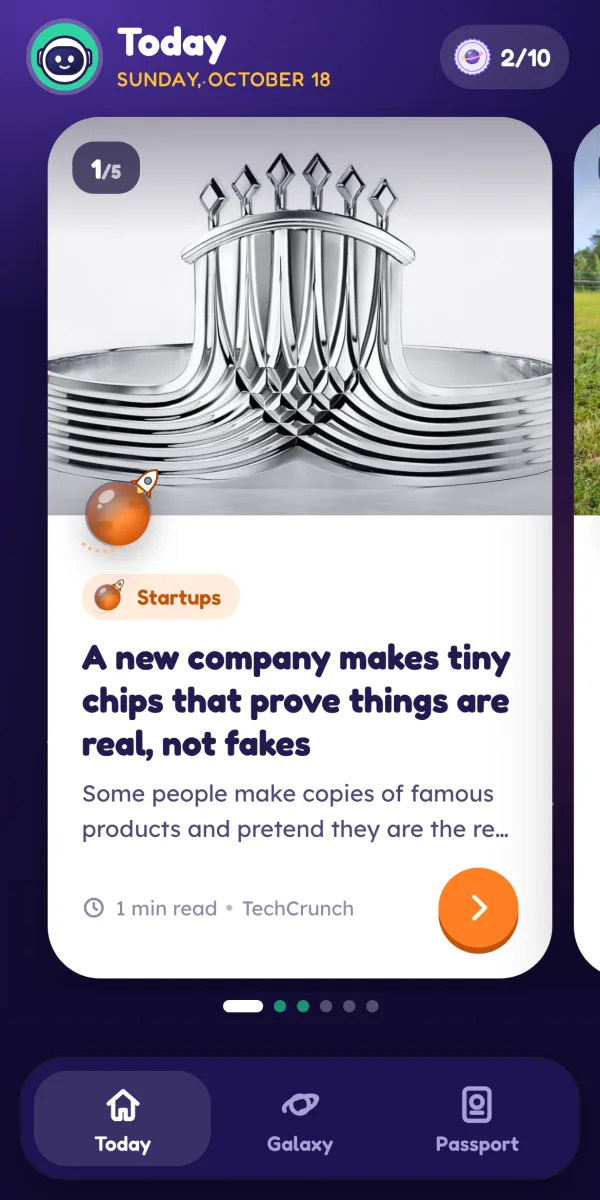
Osmo, our science news app, was built around tactic two. Each day has a short edition of five stories, finishable in minutes, with no endless feed and no streaks, on purpose. When the five are done, the app has nothing more to offer until tomorrow, which makes "let's go and try the activity" an easy next step.
Family media plan template
The AAP has a free online Family Media Plan tool, and the IAP also recommends that parents formulate a family media usage plan. If you prefer paper, copy this template, fill it in with your children, and stick it on the fridge. Doing it together matters: the AAP notes that school-age children are receptive to rules, and the IAP says children follow rules when they are guided "in a respectful and empathetic manner."
| Section | Our family's answer (example) |
|---|---|
| 1. What we want more of | Sleep, cycling, reading together, cricket on Sunday |
| 2. Daily limit on school days | Within our age guideline, e.g. 45 minutes after homework |
| 3. Daily limit at weekends | e.g. 1 hour, plus a family film on Saturday |
| 4. Screen-free zones | Bedrooms, dining table, car on short trips |
| 5. Screen-free times | Meals, the hour before bed, the first hour after school |
| 6. Apps and shows we've agreed on | List them. New ones need a grown-up check first. |
| 7. Settings | Autoplay off, notifications off, purchases need a parent |
| 8. One screen at a time | No TV on while using the tablet |
| 9. If something upsets me online | I tell a grown-up straight away. I won't be in trouble. |
| 10. Grown-ups promise to | Put phones away at dinner and bedtime |
| 11. Where devices sleep | Charging in the kitchen overnight |
| 12. Review date | Start of each school term, and the summer holidays |
The AAP suggests revisiting your plan often, especially at the start of the school year and during breaks. It also helps to share it with grandparents and anyone else who looks after your children, so the rules are the same in every house.
Healthy screen time by age: what it looks like day to day
- Under 2: no screens, except occasional video calls with family who live far away (IAP). Screens should not be used to feed or calm a baby.
- 2 to 5: short sessions with you, chosen content that is educational, non-violent and preferably interactive, and one screen at a time (IAP).
- 5 to 10: a total under two hours, mostly for learning and connection; co-view and monitor; the device belongs to a parent; no social media (IAP). The AAP says children this age "are not ready for social media accounts."
- 11 to 14: balance screens with at least an hour of outdoor activity and 8 to 9 hours of sleep (IAP), and talk about what they watch, including ads, privacy and fake news.
For specific app picks at the older end, see our guide to the best educational apps for 10 year olds, which includes a privacy checklist.
What to say when they push back
- "But it's educational!" "I love that you chose that. It still comes out of today's screen time. Let's pick the best one."
- "Everyone else has more." "Every family's plan is different. This is ours, and we'll review it together next term."
- "I'm bored." "Great. Boredom is where good ideas start. Pick something from the boredom box."
- "Just five more minutes." "We agreed on the plan together. Two minutes to finish, then the park."
Healthy screen time is not about zero. It is about screens that leave your child a little more curious and a little more capable, with plenty of the day left over for everything else. Our guide on how to raise a curious child has ideas for filling that time.
Frequently asked questions
How much screen time is healthy for kids?
It depends on age. The WHO advises no screen time under 1, no sedentary screen time at age 1, and no more than an hour a day for ages 2 to 4. India's IAP recommends no screens under 2, a maximum of one supervised hour a day from 2 to 5, and less than two hours from 5 to 10. For older children, focus on protecting sleep, activity and family time.
Does educational screen time count as screen time?
Yes, in most guidance. India's IAP guidelines for ages 5 to 10 say the two-hour limit includes time on screens for educational and extra-curricular assignments. Research does suggest the type of screen time matters: a study of 4,013 Australian children linked educational use with better school outcomes and passive viewing with worse ones, though the effects were small.
What is the difference between active and passive screen time?
Passive screen time is watching with little thought or choice, like autoplaying videos. Active screen time asks the child to think, create or move: coding a game, reading and answering questions, video calling a grandparent. Active use is generally the better kind, but it is still screen time and still needs a stopping point.
How do I reduce screen time without constant fights?
Agree the rules in advance and write them down, so the plan is the boss rather than you. Give a warning before time is up, replace screens with something specific rather than just saying no, and keep devices out of bedrooms. The AAP suggests asking what your family wants to get back, such as sleep or play, rather than only cutting minutes.
What is a family media plan?
It is a short written agreement about when, where and how your family uses screens. The AAP offers a free Family Media Plan tool, and suggests screen-free zones, a one-screen-at-a-time rule, turning off autoplay and notifications, choosing quality content and revisiting the plan often. India's IAP also recommends parents create a family media usage plan.
Sources
- WHO: To grow up healthy, children need to sit less and play more (2019)
- 2020 WHO guidelines on physical activity and sedentary behaviour for children and adolescents aged 5 to 17: summary of the evidence
- Indian Academy of Pediatrics Guidelines on Screen Time and Digital Wellness in Infants, Children and Adolescents (Indian Pediatrics, 2022)
- AAP / HealthyChildren.org: Kids and Screen Time, How to Use the 5 C's of Media Guidance
- AAP / HealthyChildren.org: How to Make a Family Media Use Plan
- AAP / HealthyChildren.org: Kids and Screen Time, 5 C's Questions for School-Age Children
- AAP / HealthyChildren.org: Watch Together, Co-Viewing Media With Your Child
- Sanders et al. (2019), Type of screen time moderates effects on outcomes in 4013 children, International Journal of Behavioral Nutrition and Physical Activity
Written and fact-checked by the Osmo Editorial Team. Osmo is not affiliated with the apps, publishers or organisations mentioned. Spotted something out of date? Tell us.