Quick answer
The best educational apps for 10 year olds match what this age is ready for: reading longer texts, real coding, harder maths and big questions about the world. A strong, mostly free set is Scratch for coding, Khan Academy or Prodigy for maths, a library app for reading, and one science app.
- Reading: Libby (free via libraries), StoryWeaver (free, Indian languages), Epic (subscription).
- Coding: Scratch, Lightbot: Code Hour, Hopscotch, Tynker.
- Maths: Khan Academy, Prodigy Math, Zearn (via schools).
- Science: the NASA app and Osmo (our app).
- Safety: check the privacy label, ads, purchases and chat before you install.
Ten is a great age for apps, and a tricky one. Your child in Class 4 or 5 (Grade 4 or 5 in the US) can now read real books, follow multi-step instructions and get properly absorbed in a project. They are also old enough to want what their friends have, and young enough that most of the internet is not built for them.
This guide to the best educational apps for 10 year olds starts with what children this age actually need, then gives verified picks by subject, then a privacy and safety checklist based on the US COPPA rule and India's Digital Personal Data Protection Act. Every app was checked on its official page or store listing in October 2026. Osmo is our app, and we have labelled it clearly.
What 10 year olds need from an app
Child development guides describe a typical 10-year-old like this. Most can read and understand a paragraph of complex sentences, are reading chapter books, and may seek out books and magazines on subjects that interest them. They are skilled at addition and subtraction and building skills in multiplication, division and fractions. They can write simple stories. They enjoy friends and team activities, and still like and listen to their parents, though some start to show irritation with adults in charge.
That translates into four things to look for:
- Depth over drills. They can handle longer reading and open-ended projects. An app that only asks them to tap the right answer will bore them quickly.
- Room for an obsession. Space, animals, robots, money. Apps that let them go deep on a special interest feed motivation better than any points system.
- Making, not just consuming. Coding, writing and building apps put them in charge.
- No social pressure. The American Academy of Pediatrics (AAP) says school-age children "are not ready for social media accounts." Apps with public chat, follower counts or streaks bring social pressure in through the side door.
Reading apps for 10 year olds
At ten, the job of reading changes from decoding words to reading for meaning and for pleasure. The best reading apps for 10 year olds give them lots of good books at the right level.
Libby (free through public libraries)
Libby, from OverDrive, lets you borrow ebooks and audiobooks from public libraries that offer it, at no charge. If your library is a member, this is the cheapest way to keep a fast reader supplied. Browse the children's section together the first time.
StoryWeaver by Pratham Books (free)
Pratham Books, an Indian not-for-profit publisher, hosts its stories on StoryWeaver, a digital library with stories in languages from India and beyond, shared under Creative Commons licences. Excellent for Hindi and other Indian-language reading alongside English.
Epic (subscription)
Epic offers more than 40,000 books, audiobooks and learning videos, including read-to-me titles. It is free for educators and students during the school day through Epic School. For families it is a subscription that begins with a 7-day free trial, and store prices vary by region.
Osmo: reading about real science (our app)
Many ten-year-olds who "don't like reading" love reading about something real. Osmo publishes five short science and technology stories every day, rewritten by AI at three reading levels using only facts from the original article, and approved by a person on our team before children see them. The Grades 3 to 5 level fits most ten-year-olds, and the Grades 6 to 9 level is there when they are ready.
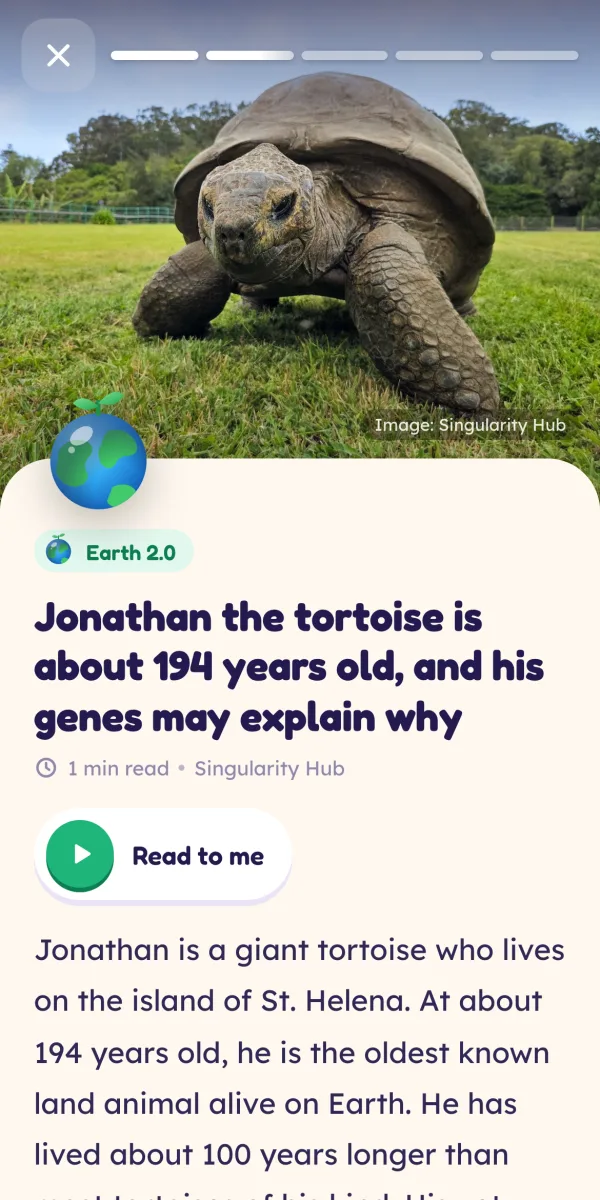
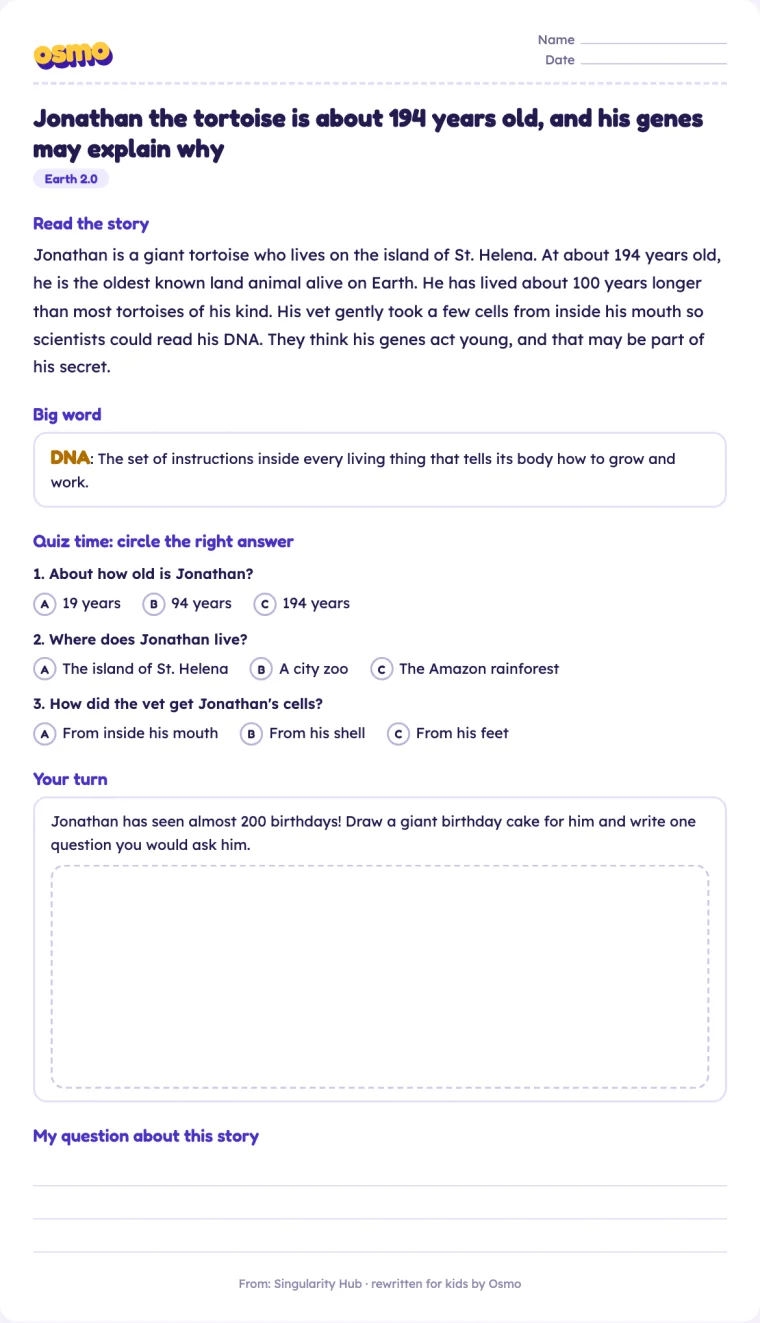
Children can tap any word for its meaning, each story has a "big word", and a 3-question quiz checks understanding. Here is a real Grades 3 to 5 example about Jonathan the tortoise:
"At about 194 years old, he is the oldest known land animal alive on Earth. He has lived about 100 years longer than most tortoises of his kind."
If your child likes paper too, Osmo Plus adds a printable worksheet for every story (the story, its big word, the quiz and a hands-on "Your turn" activity). You can try one free: the Jonathan the tortoise worksheet for Grades 3 to 5.
For more on building comprehension at this age, see our guide to reading comprehension for Class 3, 4 and 5.
Coding apps for 10 year olds
Ten is the sweet spot for coding apps for 10 year olds that move beyond picture blocks to real projects.
- Scratch (free). "Designed especially for ages 8 to 16", free of charge, in more than 40 languages, from the nonprofit Scratch Foundation. Children make games, animations and stories and can share them with a large community. The first project to try: a simple quiz game about their favourite topic.
- Lightbot: Code Hour (free). 20 puzzle levels teaching procedures and loops by guiding a robot, with no in-app purchases. An older app, but a fun warm-up.
- Hopscotch (free, optional subscription). Labelled "Made for Ages 9 to 11" on the App Store. Kids make games and art and can publish to a moderated community. Hopscotch Pro costs $9.99 a month or $79.99 a year in the US listing.
- Tynker (paid plans). Structured coding courses for ages 5 to 18, with a free start and paid plans for up to three children.
- CodeAI, formerly Code.org (free). Renamed in June 2026, it says its curriculum and tools stay free. Works in a browser.
Maths and science apps
Maths
- Khan Academy (free). A nonprofit with free courses from kindergarten through early college. Perfect for practising whatever Class 4 or 5 topic your child is on, like fractions.
- Prodigy Math (free, optional membership). A fantasy game for Grades 1 to 8 where battles mean solving maths questions. Prodigy says it aligns to standards in several countries, including India. Memberships add parent tools and extras.
- Zearn (through schools). A nonprofit K to 8 maths platform that is free for teachers and classrooms. If your child's school uses it, practise at home with their class login.
- Kahoot! Algebra by DragonBox (subscription). Puzzle-based equation solving, 200 puzzles. Needs a Kahoot! Kids subscription after a 7-day trial.
Science
- NASA app (free). Images, mission news, podcasts, augmented reality and NASA+ video, with no subscription. Best explored together.
- Osmo (free daily edition). Five real science and tech stories a day across 10 topic "planets", from Mars and Beyond Earth to Cybersecurity and Startups, with a passport of planet stamps earned by reading. No streaks, on purpose.
For a wider list organised by science, technology, engineering and maths, see our best STEM apps for kids guide.
Best apps for 10 year olds: free picks at a glance
| Need | App | Cost | Who makes it |
|---|---|---|---|
| Coding | Scratch | Free | Scratch Foundation (nonprofit) |
| Coding | CodeAI | Free | CodeAI (nonprofit) |
| Maths | Khan Academy | Free | Khan Academy (nonprofit) |
| Maths | Prodigy Math | Free, optional membership | Prodigy |
| Reading | Libby | Free via member libraries | OverDrive |
| Reading | StoryWeaver | Free, openly licensed | Pratham Books (not-for-profit) |
| Space | NASA app | Free | NASA |
| Science news | Osmo (ours) | Free daily edition, optional Plus | Neobound AI |
If you are looking for the best apps for 10 year olds free of ads and subscriptions, start with the nonprofit and public ones in this table. They have the least reason to push purchases.
Privacy and safety checklist for apps for 10 year olds
Two laws are worth knowing, whichever country you are in, because they tell you what a well-behaved app should do.
COPPA (United States)
The FTC's Children's Online Privacy Protection Rule applies to apps and websites directed to children under 13, and to others that know they are collecting data from under-13s. They must post a clear privacy policy, give parents direct notice and get verifiable parental consent before collecting a child's personal information, and let parents review or delete it. "Personal information" includes names, contact details, photos, video or audio of a child, persistent identifiers like cookie IDs, and precise location. The rule was amended in April 2025.
DPDP Act 2023 (India)
India's Digital Personal Data Protection Act treats anyone under 18 as a child. Before processing a child's personal data, an organisation must obtain verifiable consent from a parent. It must not process data in a way likely to harm a child's well-being, and it must not track or behaviourally monitor children or target advertising at them (with limited exceptions set by the Rules). The DPDP Rules were notified on 14 November 2025 with an 18-month phased compliance period, and violations of the obligations relating to children can attract penalties of up to ₹200 crore.
The 10-point checklist
- Read the privacy label. Google Play's Data safety section shows what is collected and shared. The App Store's labels show data "linked to you" and "not linked to you", or say the developer does not collect any data.
- Does it need an account? If so, whose email? A parent's, ideally, or none at all.
- Ads? Look for "Contains ads" on the listing.
- In-app purchases? Turn on purchase approval in your device's family settings.
- Chat or contact with strangers? If there is any, check how it is moderated, or skip the app.
- Public sharing? Communities like Scratch's can be great. Agree on rules: no real names, school names or photos.
- Streaks and endless feeds? These are designed to bring children back. Prefer apps with a natural stopping point.
- Who makes it? Nonprofits, public bodies and established publishers are easier to trust.
- Teacher Approved badge. On Google Play, teachers and specialists rate kids' apps for age fit, ads and purchases. A helpful signal, not a guarantee.
- Can you delete the data? Good apps make it easy.
As one example of what this can look like: Osmo has no accounts, email or phone number, uses an anonymous nickname profile, shows no ads, contains no tracking or analytics SDKs, has no chat between users, keeps settings and purchases behind a grown-ups-only times-table check, and lets you delete all data instantly in the app. You can read the details on our privacy page.
How to get the most from the best educational apps for 10 year olds
- Give each app a job and a time. "Scratch after homework on Tuesdays and Thursdays" works better than "you can use the tablet."
- Co-play the first session. The AAP suggests watching shows and playing games together to see whether you like the messages they carry.
- Let them teach you. Ask them to show you how their Scratch game works. Explaining is learning.
- Protect sleep. The AAP advises putting devices away at bedtime, and the IAP's general guidance is to switch screens off an hour before bed.
- Write it down. A one-page family media plan stops daily negotiations. We have a template in our guide to educational screen time for kids.
Ten-year-olds are ready for real ideas. The best educational apps for 10 year olds respect that. Choose a few, keep them in shared spaces, and leave plenty of the day for books, friends and being outside. More tips for parents are on our grown-ups page.
Frequently asked questions
What apps should a 10 year old have?
Aim for a small set with a clear job each: one reading app (a library app such as Libby or StoryWeaver), one coding app (Scratch), one maths app (Khan Academy or Prodigy) and one curiosity app for science or news. Four good apps used on purpose beat twenty used at random. Keep social media off the list: the AAP says children this age are not ready for social media accounts.
Should a 10 year old have their own phone or tablet?
That is a family decision, but India's IAP guidelines for ages 5 to 10 say the device a child uses should belong to a parent, and that a child should not get an independent phone, tablet or laptop. Many families share one device kept in a common room, which also makes co-viewing and checking content much easier.
How much screen time is OK for a 10 year old?
India's Indian Academy of Pediatrics recommends less than two hours a day for ages 5 to 10, and that includes screen time for school assignments. The WHO advises limiting recreational screen time for ages 5 to 17 and getting an average of 60 minutes of moderate to vigorous activity daily. Sleep, play and homework come first.
Are there good free apps for 10 year olds?
Yes. Scratch, Khan Academy, the NASA app and Read Along by Google are free, and Libby is free through public libraries that offer it. Prodigy Math's maths content is free with an optional membership. Osmo's daily edition is free too. Free apps from nonprofits and public bodies are often the safest place to start.
How do I know if a kids app is safe?
Check the store listing's privacy section (Data safety on Google Play, App Privacy on the App Store), look for ads, in-app purchases and chat features, and read who makes the app. In the US, COPPA requires verifiable parental consent before collecting personal information from children under 13. In India, the DPDP Act 2023 requires parental consent for under-18s.
What are good coding apps for 10 year olds?
Scratch is the best starting point: free, designed for ages 8 to 16 and available in more than 40 languages. Lightbot: Code Hour is a free logic puzzle warm-up. Hopscotch is labelled for ages 9 to 11 with an optional subscription, and Tynker offers structured paid courses. CodeAI, formerly Code.org, keeps its activities free.
Sources
- Milestones for 10-Year-Olds (Healthwise / WebMD Ignite, via Kaiser Permanente)
- AAP / HealthyChildren.org: Kids and Screen Time, 5 C's Questions for School-Age Children
- Indian Academy of Pediatrics Guidelines on Screen Time and Digital Wellness (Indian Pediatrics, 2022)
- 2020 WHO guidelines on physical activity and sedentary behaviour for children and adolescents aged 5 to 17
- Epic: Kids' Books and Reading on the App Store
- Libby, the library app by OverDrive
- Pratham Books (StoryWeaver)
- About Scratch (Scratch Foundation)
- Hopscotch: Programming for Kids on the App Store
- Lightbot: Code Hour on the App Store
- Tynker home page
- Code.org is now CodeAI (press release, June 2026)
- About Khan Academy
- Prodigy Math for parents
- About Zearn
- Kahoot! Algebra by DragonBox on the App Store
- NASA app on the App Store
- FTC: Complying with COPPA, Frequently Asked Questions
- FTC: Children's Online Privacy Protection Rule (COPPA)
- The Digital Personal Data Protection Act, 2023 (MeitY)
- PIB: DPDP Rules, 2025 Notified
- Google Play Help: Data safety section
- Apple: App Store privacy labels
- Google Play: Teacher Approved program
Written and fact-checked by the Osmo Editorial Team. Osmo is not affiliated with the apps, publishers or organisations mentioned. Spotted something out of date? Tell us.